This page briefly summarizes how to use the official TOMY Company, Ltd. shopping site "TAKARATOMY MALL".
Please check the contents before purchasing.
"TAKARATOMY MALL" requires membership registration when purchasing. Please be sure to register.
By registering as a member of "TAKARATOMY MALL", customer information (orderer, shipping address) is managed by ID and password, making it easier to place your next order.
Please press the "New Registration" button in the upper right corner of the "TAKARATOMY MALL" top screen and enter the items according to the items to register.

登録に必要な項目が表示されますので、ご入力お願いいたします。
「同意して登録する」のボタンを押すと、今ご入力いただきました内容が表示されますので間違えた場合は「戻る」、正しい場合は「登録する」ボタンを押してください。
You can choose or set the delivery address for your ordered items each time you place an order.
Once you register as a member, we will send you a registration email.
*If you have set up email reception settings to prevent spam, please disable the settings or set up domain restrictions beforehand. For details, click here.

本会員登録が完了後、ページ上の「ログイン」ボタンを押すと右の画面が表示されます。
Please enter the email address and password you entered when you registered as a new member.
Your registered name and number of points will be displayed in the upper left corner of the page, and the "Login" button at the top right of the page will change to "Logout," letting you know that you are currently logged in.

You need to register as a member to purchase products.
『タカラトミーモール』トップ画面上部、各商品のジャンルまたはシリーズからご希望の商品をお選びください。
We recommend that you "log in" before selecting a product. If you are "logged in," the "Login" button in the top right corner of the page will change to "Logout."

Once you have decided on the product you want, press the "Add to Cart" button.
If you wish to change the quantity, please enter the desired quantity in the quantity field.
There is a limit on the number of items that can be ordered. You cannot order more than the limit.

The title of the page will change to show your shopping cart, and the details of the items currently in your shopping cart and the total price for the items only will be displayed. If there are other items you would like to purchase, press the "Continue Shopping" button and repeat step (2) above. Once you have decided on all the items, press the "Proceed to Checkout" button.
*The total amount shown is the total amount for the product only. Please note that shipping and handling fees are not included.

The customer information you registered will be displayed as the orderer.
*You can register multiple delivery addresses by going to "New address book registration" on your My Page. Check the delivery address.

配送方法でご希望の配送日と時間が指定できます。
着日指定に関しては商品ご注文日に「配送希望日」欄のプルダウンに表示されている日付の範囲でお願いいたします。
※予約商品とメール便対応商品は着日指定できません。
ポイント使用を選ぶことができます。
お支払方法をお選びください。
クレジットカード・PayPay決済・NP後払い(コンビニ・郵便局・銀行)・atone 翌月払い(コンビニ/口座振替)・Amazon Pay・コンビニ決済よりお選びいただけます。


Please enter the coupon code you wish to use in the "Coupon/Campaign Code" field. You can check the coupon amount on the "Order Confirmation Page."
Please enter the campaign code you wish to use in the "Coupon/Campaign Code" field.
Multiple discount codes cannot be used.
You can check the discount amount on the "Order Confirmation Page".
When using a coupon code or campaign code, the paid product price (= total product price after discount) will be the condition for the campaign to apply.

「ご購入手続き(注文確認)」ページです。この段階で送料が発生する場合(ご注文商品代金の合計が5,500円未満の場合に発生)、送料が「配送料」に加算されお客様からいただく最終ご請求金額が決定いたします。
また、今回のご注文内容をこのページで全て確認できますので、間違いが無い事をご確認ください。
If you choose credit card payment, please enter your credit card details in the form.
Click "Agree to the terms and conditions and place your order" to complete the process.

ご注文完了画面にタカラトミーモール用オーダーIDが表示されます。お問い合わせの際等に必要となりますのでお客様ご自身でお控えください。(注文受付メールやマイページの購入履歴にも表示されます) ご注文完了後のお客様都合でのキャンセル・交換・返品は承っておりません。
If the product you receive is different from what you ordered, you may exchange it for a new product within 7 days of receiving the product. In this case, you must contact the service center (TEL 0120-950-108) to exchange it for a new product.
If you have any questions about the product you have purchased, or if there are any initial defects, malfunctions, or missing parts, please contact the manufacturer's contact information listed on the product packaging.
Regardless of the above, please note that we cannot accept returns or exchanges for the following products:

A "TOMY MALL Order Confirmation Email" will be sent to the email address registered on your My Page after the "Order Complete" screen is displayed. The sending of this email, which contains the details of your order, means that your order has been successfully completed.
Is the email address you registered correct?
After logging in, please check the "Change Member Information" section on your My Page and correct any incorrect information if it has been registered.
If you are using a PC, please check your email filter settings. (The email may have been sorted into a spam folder.)
If your mobile phone is set to block emails, please change the settings to receive emails from the "@takaratomymall.jp" domain.
Also, please check that your mail server capacity is not full.
タカラトミーモールでは、株式会社ReviCoのレビュープラットフォームサービス「ReviCo」を利用し、
お客様からいただいた、ご購入商品の評価、レビュー情報をサイト内に掲載させていただいております。
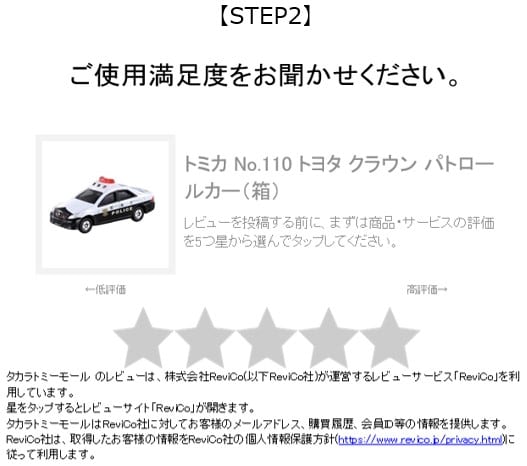
商品発送から数日後、お客様のメールアドレスに、「レビュー投稿依頼メール」が届きます。
こちらの「レビュー投稿依頼メール」からレビューを投稿する流れとなります。
※「レビュー投稿依頼メール」は、ご注文いただいたときに登録されたメールアドレスに配信いたします。
ご注文いただいた商品ごとに、商品を評価する★印があります。
★印をクリックしていただくとレビュー投稿ページが表示されます。
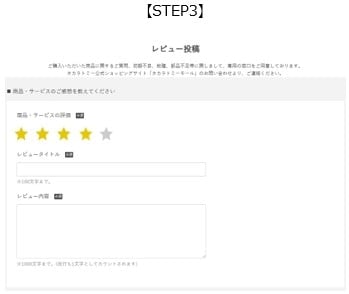
レビュー投稿ページより、商品の評価とレビュータイトルとレビュー内容を入力してください。
こちらでレビュー投稿は完了となります。
ReviCoのプレゼントキャンペーンに応募するには、続けて、簡単なアンケートとReviCoの会員登録を行うことで応募完了となります。
・レビューを投稿いただいてからレビュー一覧へ反映されるまでに、日数がかかる場合があります。
・1商品に対して、レビュー投稿は1件のみ可能です。
・投稿いただいてから、24時間経過後は、内容の修正ができません。
・「投稿依頼メール」の再送はできません。
・一部、レビューの投稿ができない商品があります。
・購入していない商品への商品レビューを投稿することはできません。
・タカラトミーグループ社員及び関係者はレビュー投稿できません。
Telephone order reception desk: TOMY MALL Customer Center 0120-950-108
Reception hours: Weekdays 10:00-17:00
*If there are any changes to reception hours, such as during the New Year holidays, we will announce it in advance on the website.
The personal information obtained from customers will be used for shipping products and responding to inquiries.
For details on the handling of personal information, please click here.
⇒ Regarding the handling of personal information
送料は全国一律748円、5,500円以上お買い上げで送料当社負担になります。
お支払方法 NP後払い(手数料248円)
The following groups A to C cannot be ordered at the same time.
You must register as a member to purchase products.
Products sold at "TOMY MALL" are those listed on our online shopping site, and orders can only be placed through the order form displayed when ordering at "TOMY MALL".
If the item you want is out of stock, you can sign up to be notified when it becomes available.
Click "Subscribe to receive stock notifications" to complete your email notification application. You will be notified by email when the product arrives or when a pre-order item is added.

『タカラトミーモール』では、クレジットカード決済、PayPay決済、NP後払い(コンビニ・郵便局・銀行)、atone 翌月払い(コンビニ/口座振替)、Amazon Pay決済、コンビニ決済をご用意しております。
また予約商品・限定商品等、商品により決済方法を限定させていただく場合がございます。
| Payment Method | Pre-order items | Regular products |
|---|---|---|
| Credit card | ○ | ○ |
| PayPay payment | 〇 | 〇 |
| NP Pay Later (convenience stores, post offices, banks) | ○ | ○ |
| atone Next month payment (convenience store/direct debit) | ○ | ○ |
| Amazon Pay | △ | ○ |
| Convenience store payment | ○ | × |
※2025年3月28日より代金引換決済はご利用いただけません。
The following credit cards can be used at TOMY MALL.

The purchase price will be billed by your card company in the same way as regular card charges, based on the terms and conditions of each credit card membership.
Payment services such as various debit cards and prepaid cards (e.g. au Wallet, SoftBank Card) cannot be used.
Please do not enter your credit card number in the field.
What is 3D Secure?
This is an identity authentication service that allows you to make online purchases using your credit card more safely. It can prevent fraudulent use such as "spoofing" through the theft of credit card information.
How to use 3D Secure
The password to be used with 3D Secure must be registered and issued in advance by the credit card issuer.
Please contact the card issuer listed on the back of your card to find out whether your credit card supports 3D Secure and how to set it up and use it.
TOMY MALL does not directly collect or store customer card information; instead, it processes credit card payments using the functions of a payment processing company, DG Financial Technology, Inc.
デビットカードやプリペイドカードなど、利用と同時に残高が引き落とされるタイプのカードについては、以下のようなトラブルが発生する可能性があるため、当店では推奨しておりません。
ご利用の際は、必ず下記内容をご確認いただき、お客様の責任にてお手続きください。
※ご利用のカードが即時引き落とし型か不明な場合は、カード会社へお問い合わせください。
発生しやすい事象
・一時的に二重で引き落としが行われる場合がある
・与信確認状況により、返金まで時間がかかることがある
与信確認について
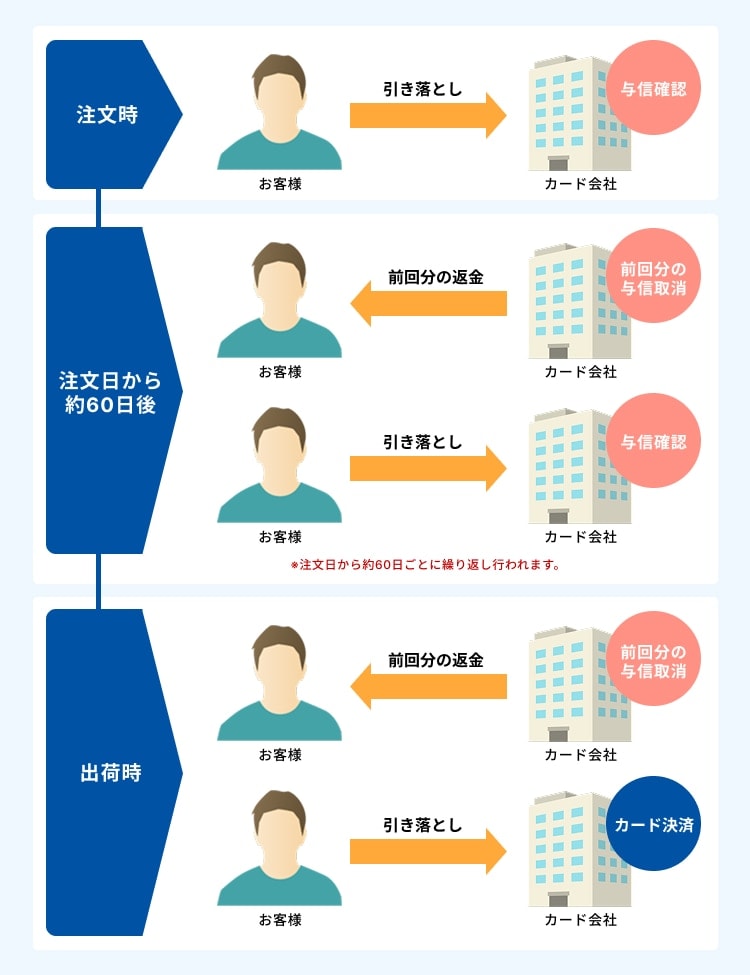
当店ではクレジットカード決済は商品出荷時に行いますが、予約注文時に即時引き落としカードをご利用の場合、注文時にカード有効性確認のため与信確認が発生します。
さらに、注文日から約60日ごとに、前回の与信を取り消し、新たな与信確認が行われます。
この際、残高から引き落としが発生し、前回分は返金されますが、カード会社への反映に時間がかかる場合があり、一時的に二重引き落とし状態になることがあります。
引き落としや返金のタイミングはカード会社ごとに異なり、当店では詳細な確認や調査はできません。
なお、商品出荷時に本決済が確定しますが、カードブランドによりタイミングが異なる場合があります。
最終的な請求額はご注文金額のみですのでご安心ください。
与信確認時エラーについて
与信確認時に残高不足などでエラーが発生する場合があります。
その際、当店またはカード会社より「クレジットカードご利用不可」の旨のお知らせが届くことがあります。
カード会社からお知らせを受け取った場合は、当店では確認できませんので、指示に従ってください。
PayPay payment is a payment method that allows you to pay from your PayPay account. You can choose from PayPay balance or credit (formerly known as deferred payment).

When making a payment using your PayPay balance, you will need to charge your account with an amount equal to or greater than the payment amount in advance.
You cannot charge your PayPay balance at TOMY MALL.
You can top up your PayPay balance via the PayPay app or compatible bank ATMs.
You must make the payment within 5 minutes after the PayPay screen appears.
If you wait longer than 5 minutes, an error screen will be displayed. Please display the PayPay screen again and make the payment within 5 minutes.
For details about PayPay payments, please visit the PayPay official website.
Notes about NP Pay Later (convenience stores, post offices, banks)
If you select NP Pay Later (convenience store, post office, bank) on our online shopping site, it is a safe and easy payment method that allows you to pay later at a convenience store, post office, or bank.

This is a safe and easy payment method that allows you to pay later at a convenience store, post office, or bank after confirming the arrival of the product. The invoice will be mailed separately from the product, so please pay within 14 days of issuance.
後払い手数料:248円
後払いのご注文には、株式会社ネットプロテクションズの後払いサービスが適用され、同社へ代金債権を譲渡します。
NP後払い利用規約及び同社のプライバシーポリシーに同意して、後払いサービスをご選択ください。
ご利用限度額は累計残高で55,000円(税込)迄です。なお、初回の注文時は30,000円(税込)までのご利用となります。
詳細は上のバナーをクリックしてご確認ください。
またNP後払いを選ばれた方で、銀行から支払いをされる場合は、別途振込み手数料が必要となります。振り込み手数料は銀行により異なりますので、ご利用の銀行にお問い合わせください。
NP後払いには与信審査がございます。審査が通らなかった場合はご注文がキャンセルとなり、タカラトミーモールよりご登録のメールアドレス宛に通知いたします。
Notes about atone next month payment (convenience store/direct debit)
atone (アトネ) はクレジットカードなしで使えて、ポイントが貯まるおトクな後払いです。
貯まったポイントは、atoneのお買い物に使えます。

■ご利用の流れ
(1) 支払い方法で「atone 翌月払い (コンビニ/口座振替) 」を選び、携帯番号とパスワードを入力する。■お支払い方法・期限日
・コンビニ端末 / 銀行ATM(Pay-easy):翌月10日
初期設定はコンビニ端末/銀行ATM(Pay-easy) です。変更する場合は、スマホアプリまたはWebマイページから、月末までにお手続きください。
※atoneスマホアプリのダウンロードはこちら
ご利用月のみ請求手数料が発生いたします。詳細はatone の公式ページをご覧ください。
What is Amazon Pay? Amazon Pay is a payment method that allows you to easily shop using the shipping address and credit card information registered on Amazon.co.jp.

ご注文後の配送先、注文内容の変更はできません。
Amazonポイント・Amazonギフトはご利用できません。
※お客様ご自身でAmazon Payにチャージして頂ければご利用頂けるようになります。詳しくはこちらをご覧ください。
限定品や、一部予約商品ではご利用できない場合がございます。
各種クーポンコード・キャンペーンコードのご利用は、タカラトミーモール会員登録が必要です。
アプリからご購入の際はご利用できません。
コンビニエンスストアにて、注文完了時のお支払い受付番号もしくは払込票を用いてお支払いいただく方法となります。お支払い上返金額は手数料込みで300,000円までとなります。お支払期限は注文完了から2日後の23:59までとなります。
コンビニ決済には手数料340円が必要となりますのでご確認の上ご注文ください。
以下の店舗でお支払いができます。
セブンイレブン、ローソン、ファミリーマート、ミニストップ、セイコーマート、デイリーヤマザキ
※一部ご利用いただけない商品がございます。
また期日までにご入金いただけない場合は、キャンセルとなります。お支払い後の返金はお受けできません。
コンビニ決済時の各社でのお支払いについての詳細はこちらをご確認ください。
DGFTお客様サポート https://www.veritrans.co.jp/user_support/
When ordering from "TOMY MALL", the following fees will be charged in addition to the product price.
If the total amount of your order is less than 5,500 JPY (Tax incl.), you will be charged a flat shipping fee of 748 JPY (Tax incl.) nationwide.
For some products (marked as Hikyaku Yu-Packet), customers will be charged 350 JPY (Tax incl.) as shipping fee.
→Subscribe to our email newsletter
When placing an order, any fees required for credit card payment will be borne by TOMY MALL and will not be charged to you.
ご注文商品の決済方法として「NP後払い(コンビニ・郵便局・銀行)」を選ばれた方が対象になります。後払い手数料は一律248円をお客様にご負担いただきます。
※NP後払いを選ばれた方で、銀行から支払いをされる場合は、別途振込み手数料が必要となります。振り込み手数料は銀行により異なりますので、ご利用の銀行にお問い合わせください。
コンビニ決済手数料は一律340円をお客様にご負担いただきます。
『タカラトミーモール』では商品発送の目安としてご注文後、タカラトミーモール稼働日3日以内の発送とさせていただいております。ただし、『タカラトミーモール』の長期休業期間中は、商品発送までの3日に長期休業期間の日数を追加させていただきます。
予約品(発売前)の商品は配送希望日指定はできません。
一部の商品では、お一人様または一世帯当たりの購入数制限を設けております。
対象商品につきまして、以下に該当するご注文は、
ご注文確定後であっても利用規約に基づきキャンセルさせていただく場合がございます。
・購入回数を分けるなどして、購入制限数を超えるご注文
・複数アカウントの作成・なりすましによるご注文
・氏名、住所、連絡先、決済情報、端末情報等から、同一人物と判断されるご注文
・その他、弊社が不正または転売目的と判断した場合
なお、キャンセル対象のご注文に同時に含まれていた他商品・景品等につきましても、あわせてキャンセルといたします。
その際、在庫の確保などは行いません。あらかじめご了承ください。
また、キャンセル理由の個別のご案内は行っておりません。
多くのお客様に公平にご購入いただくため、何卒ご理解・ご協力をお願いいたします。
![[TOMY Company, Ltd. Official ] TOMY MALL [Official] Online Store for Toys and Action figures](/img/usr/header/tt_logo_tomy1_3.png)